

psql.
You then learn how to conduct analysis on your dataset using Timescale
hyperfunctions. It walks you through creating a series of s,
and querying the aggregates to analyze the data. You can also use those queries
to graph the output in Grafana.
Prerequisites
To follow the steps on this page:- Create a target with the Real-time analytics capability enabled. You need your connection details. This procedure also works for .
- Sign up for a Grafana account to graph your queries (optional).
Ingest data into a service
This tutorial uses a dataset that contains Bitcoin blockchain data for the past five days, in a namedtransactions.
Optimize time-series data using hypertables
s are tables in that automatically partition your time-series data by time. Time-series data represents the way a system, process, or behavior changes over time. s enable to work efficiently with time-series data. Each is made up of child tables called chunks. Each chunk is assigned a range of time, and only contains data from that range. When you run a query, identifies the correct chunk and runs the query on it, instead of going through the entire table. is the hybrid row-columnar storage engine in used by . Traditional databases force a trade-off between fast inserts (row-based storage) and efficient analytics (columnar storage). eliminates this trade-off, allowing real-time analytics without sacrificing transactional capabilities. dynamically stores data in the most efficient format for its lifecycle:- Row-based storage for recent data: the most recent chunk (and possibly more) is always stored in the , ensuring fast inserts, updates, and low-latency single record queries. Additionally, row-based storage is used as a writethrough for inserts and updates to columnar storage.
- Columnar storage for analytical performance: chunks are automatically compressed into the , optimizing storage efficiency and accelerating analytical queries.
- Connect to your In open an SQL editor. The in-Console editors display the query speed. You can also connect to your service using psql.
-
Create a for your time-series data using CREATE TABLE.
For efficient queries on data in the , remember to
segmentbythe column you will use most often to filter your data:If you are self-hosting v2.19.3 and below, create a relational table, then convert it using create_hypertable. You then enable with a call to ALTER TABLE. -
Create an index on the
hashcolumn to make queries for individual transactions faster: -
Create an index on the
block_idcolumn to make block-level queries faster: When you create a , it is partitioned on the time column. automatically creates an index on the time column. However, you’ll often filter your time-series data on other columns as well. You use indexes to improve query performance. -
Create a unique index on the
timeandhashcolumns to make sure you don’t accidentally insert duplicate records:
Load financial data
The dataset contains around 1.5 million Bitcoin transactions, the trades for five days. It includes information about each transaction, along with the value in satoshi. It also states if a trade is a coinbase transaction, and the reward a coin miner receives for mining the coin. To ingest data into the tables that you created, you need to download the dataset and copy the data to your database.-
Download the
bitcoin_sample.zipfile. The file contains a.csvfile that contains Bitcoin transactions for the past five days: bitcoin_sample.zip -
In a new terminal window, run this command to unzip the
.csvfiles: - In Terminal, navigate to the folder where you unzipped the Bitcoin transactions, then connect to your using psql.
-
At the
psqlprompt, use theCOPYcommand to transfer data into your . If the.csvfiles aren’t in your current directory, specify the file paths in these commands:Because there is over a million rows of data, theCOPYprocess could take a few minutes depending on your internet connection and local client resources.
Connect Grafana to Tiger Cloud
To visualize the results of your queries, enable Grafana to read the data in your :-
Log in to Grafana
In your browser, log in to either:
- Self-hosted Grafana: at
http://localhost:3000/. The default credentials areadmin,admin. - Grafana Cloud: use the URL and credentials you set when you created your account.
- Self-hosted Grafana: at
-
Add your as a data source
-
Open
Connections>Data sources, then clickAdd new data source. -
Select
PostgreSQLfrom the list. -
Configure the connection:
-
Host URL,Database name,Username, andPasswordConfigure using your connection details.Host URLis in the format<host>:<port>. -
TLS/SSL Mode: selectrequire. -
PostgreSQL options: enableTimescaleDB. - Leave the default setting for all other fields.
-
-
Click
Save & test.
-
Open
Analyze the data
When you have your dataset loaded, you can create some s and start constructing queries to discover what your data tells you. This tutorial uses hyperfunctions to construct queries that are not possible in standard . In this section, you learn how to write queries that answer these questions:- Is there any connection between the number of transactions and the transaction fees?
- Does the transaction volume affect the BTC-USD rate?
- Do more transactions in a block mean the block is more expensive to mine?
- What percentage of the average miner’s revenue comes from fees compared to block rewards?
- How does block weight affect miner fees?
- What’s the average miner revenue per block?
Create a continuous aggregate
You can use s to simplify and speed up your queries. For this tutorial, you need three s focusing on three aspects of the dataset: Bitcoin transactions, blocks, and coinbase transactions. In each definition, thetime_bucket()
function controls how large the time buckets are. The examples all use 1-hour
time buckets.
- Connect to the that contains the Bitcoin dataset.
-
Create a called
one_hour_transactions. This view holds aggregated data about each hour of transactions: -
Add a refresh policy to keep the up-to-date:
-
Create a called
one_hour_blocks. This view holds aggregated data about all the blocks that were mined each hour: -
Add a refresh policy to keep the up to date:
-
Create a called
one_hour_coinbase. This view holds aggregated data about all the transactions that miners received as rewards each hour: -
Add a refresh policy to keep the up to date:
Is there any connection between the number of transactions and the transaction fees?
Transaction fees are a major concern for blockchain users. If a blockchain is too expensive, you might not want to use it. This query shows you whether there’s any correlation between the number of Bitcoin transactions and the fees. The time range for this analysis is the last 2 days. If you choose to visualize the query in Grafana, you can see the average transaction volume and the average fee per transaction, over time. These trends might help you decide whether to submit a transaction now or wait a few days for fees to decrease.- Connect to the that contains the Bitcoin dataset.
-
At the psql prompt, use this query to average transaction volume and the
fees from the
one_hour_transactions: -
The data you get back looks a bit like this:
-
To visualize this in Grafana (optional), create a new panel, select the
Bitcoin dataset as your data source, and type the query from the previous
step. In the
Format assection, selectTime series.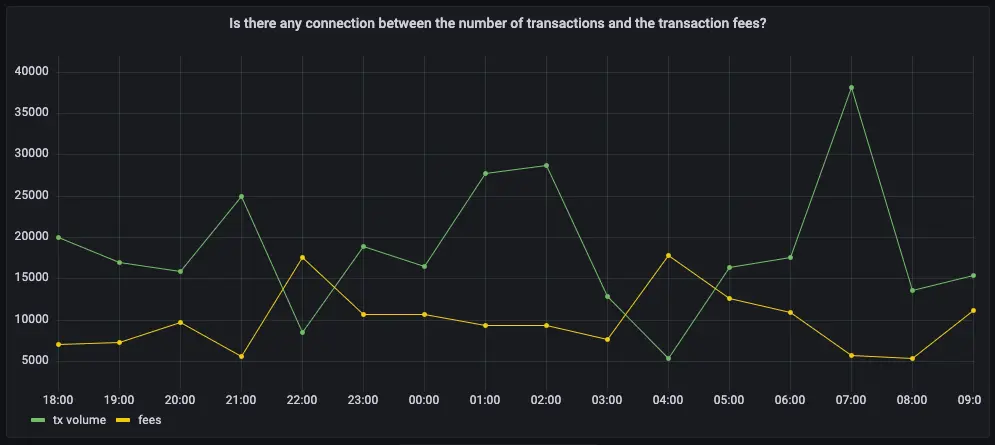
Does the transaction volume affect the BTC-USD rate?
In cryptocurrency trading, there’s a lot of speculation. You can adopt a data-based trading strategy by looking at correlations between blockchain metrics, such as transaction volume and the current exchange rate between Bitcoin and US Dollars. If you choose to visualize the query in Grafana, you can see the average transaction volume, along with the BTC to US Dollar conversion rate.- Connect to the that contains the Bitcoin dataset.
-
At the psql prompt, use this query to return the trading volume and the BTC
to US Dollar exchange rate:
-
The data you get back looks a bit like this:
-
To visualize this in Grafana (optional), create a new panel, select the
Bitcoin dataset as your data source, and type the query from the previous
step. In the
Format assection, selectTime series. -
To make this visualization more useful (optional), add an override to put
the fees on a different Y-axis. In the options panel, add an override for
the
btc-usd ratefield forAxis > Placementand chooseRight.
Do more transactions in a block mean the block is more expensive to mine?
The number of transactions in a block can influence the overall block mining fee. For this analysis, a larger time frame is required, so increase the analyzed time range to 5 days. If you choose to visualize the query in Grafana, you can see that the more transactions in a block, the higher the mining fee becomes. To find if more transactions in a block mean the block is more expensive to yours:- Connect to the that contains the Bitcoin dataset.
-
At the psql prompt, use this query to return the number of transactions in a
block, compared to the mining fee:
-
The data you get back looks a bit like this:
-
To visualize this in Grafana (optional), create a new panel, select the
Bitcoin dataset as your data source, and type the query from the previous
step. In the
Format assection, selectTime series. -
To make this visualization more useful (optional), add an override to put
the fees on a different Y-axis. In the options panel, add an override for
the
mining feefield forAxis > Placementand chooseRight.
- Connect to the that contains the Bitcoin dataset.
-
At the psql prompt, use this query to return the block weight, compared to
the mining fee:
-
The data you get back looks a bit like this:
-
To visualize this in Grafana (optional), create a new panel, select the
Bitcoin dataset as your data source, and type the query from the previous
step. In the
Format assection, selectTime series. -
To make this visualization more useful (optional), add an override to put
the fees on a different Y-axis. In the options panel, add an override for
the
mining feefield forAxis > Placementand chooseRight.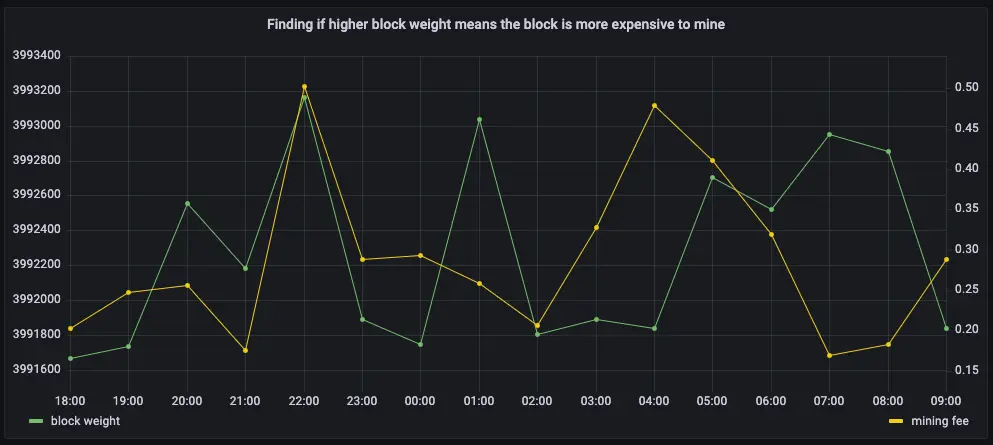
What percentage of the average miner’s revenue comes from fees compared to block rewards?
In the previous queries, you saw that mining fees are higher when block weights and transaction volumes are higher. This query analyzes the data from a different perspective. Miner revenue is not only made up of miner fees, it also includes block rewards for mining a new block. This reward is currently 6.25 BTC, and it gets halved every four years. This query looks at how much of a miner’s revenue comes from fees, compares to block rewards. If you choose to visualize the query in Grafana, you can see that most miner revenue actually comes from block rewards. Fees never account for more than a few percentage points of overall revenue.- Connect to the that contains the Bitcoin dataset.
-
At the psql prompt, use this query to return coinbase transactions, along
with the block fees and rewards:
-
The data you get back looks a bit like this:
-
To visualize this in Grafana (optional), create a new panel, select the
Bitcoin dataset as your data source, and type the query from the previous
step. In the
Format assection, selectTime series. -
To make this visualization more useful (optional), stack the series to
100%. In the options panel, in the
Graph stylessection, forStack seriesselect100%.
How does block weight affect miner fees?
You’ve already found that more transactions in a block mean it’s more expensive to mine. In this query, you ask if the same is true for block weights? The more transactions a block has, the larger its weight, so the block weight and mining fee should be tightly correlated. This query uses a 12-hour moving average to calculate the block weight and block mining fee over time. If you choose to visualize the query in Grafana, you can see that the block weight and block mining fee are tightly connected. In practice, you can also see the four million weight units size limit. This means that there’s still room to grow for individual blocks, and they could include even more transactions.- Connect to the that contains the Bitcoin dataset.
-
At the psql prompt, use this query to return block weight, along with the
block fees and rewards:
-
The data you get back looks a bit like this:
-
To visualize this in Grafana (optional), create a new panel, select the
Bitcoin dataset as your data source, and type the query from the previous
step. In the
Format assection, selectTime series. -
To make this visualization more useful (optional), add an override to put
the fees on a different Y-axis. In the options panel, add an override for
the
mining feefield forAxis > Placementand chooseRight.
What’s the average miner revenue per block?
In this final query, you analyze how much revenue miners actually generate by mining a new block on the blockchain, including fees and block rewards. To make the analysis more interesting, add the Bitcoin to US Dollar exchange rate, and increase the time range.- Connect to the that contains the Bitcoin dataset.
-
At the psql prompt, use this query to return the average miner revenue per
block, with a 12-hour moving average:
-
The data you get back looks a bit like this:
-
To visualize this in Grafana (optional), create a new panel, select the
Bitcoin dataset as your data source, and type the query from the previous
step. In the
Format assection, selectTime series. -
To make this visualization more useful (optional), add an override to put
the US Dollars on a different Y-axis. In the options panel, add an override
for the
mining feefield forAxis > Placementand chooseRight.